

Buy Complete Non-E-commerce Website Design & Development Service (Now with 53 Must-Have Features)
Original price was: ₹ 50,000.00.₹ 35,000.00Current price is: ₹ 35,000.00.
We deliver a Fully Functional Website to you. No Hidden Terms & Charges.
100% Genuine & Authentic Services
15 Years Old SEO Agency Since 2012
20,000+ Happy Customers Since 2012
30 Days 100% Money Back Guarantee. No Questions Asked.
24x7 WhatsApp Support Customer Care
100% Safe Payments via UPI
1000+ Combined Positive Reviews on Internet
Now pay for website development in 4 easy & smart payment structure.
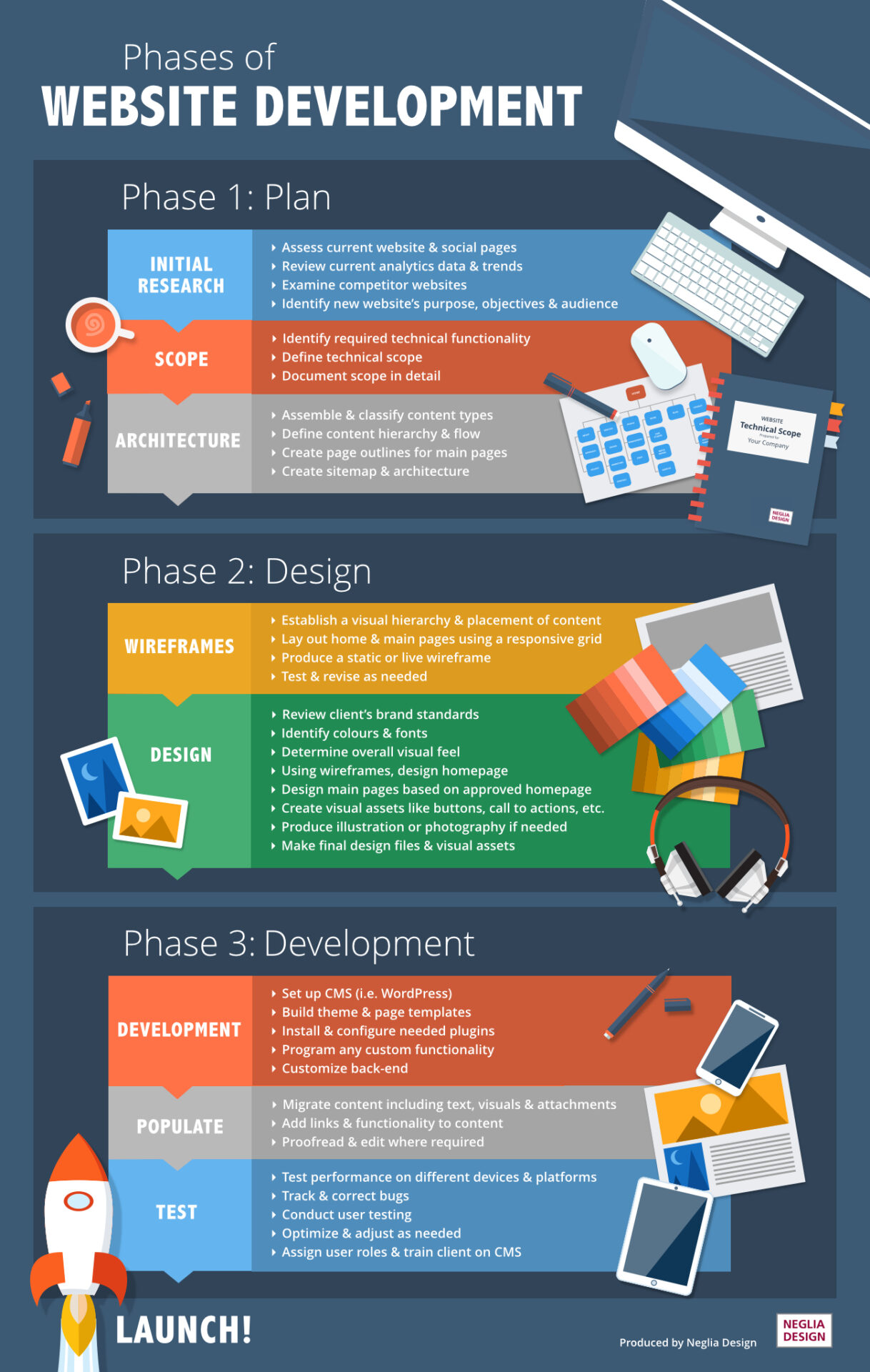
Phase 1 Payment: Refer to Side Image.
Phase 2 Payment: Refer to Side Image.
Phase 3 Payment: Refer to Side Image.
Phase 4 Payment: LAUNCH
Each Phase is of the same value
Does your Web Developer provide you with these 53 Features, if not, then Whatsapp us on +91 8447252168 and we will deliver you a World Class Website with all these features included?
Pls download the wallpaper & watch it in detail. You can also read the wallpaper text below the image. You can also download the PDF version for non-compressed image here: https://sarvotarzan.org/wp-content/uploads/2021/04/website-features-for-local-business-websites-infographic-1.pdf
Terms For Website Development: are at the below of the page.

53 Must-Have Features for Local Business Websites [Infographic]
Header and Home
1. ccTLD domain
Your domain name should represent your business or be related to your service. Additionally, a local business should have a country-specific domain (ccTLD). For an Australian website, for instance, a .com.au domain is the best choice.
A ccTLD (Country Code Top-Level Domain) is one of the strongest ways to show users and search engines where your business originates. It will help your website rank higher in search engine result pages.
2. Phone number
Mentioning a phone number is very important for local business websites. We would also recommend adding a live chat functionality. The more communication options a customer has, the better.
3. Logo
A logo is a crucial part of your online branding. An elegant, clearly designed logo helps to build trust. Consider having it placed in the upper left corner of your website where it is highly visible.
4. Main menu / Navigation bar
Your main navigation works as a map of your site. For a local business, the main navigation should contain all the important pages of your website including home, about, services/products, blog and the contact page.
Depending on your business, a slightly different menu design may be appropriate. But don’t try to get overly cute with it without a good reason; the aim of the main navigation is to let the visitor easily navigate through the site. A clear, simple and easy-to-use navigation bar is one of the key features of a good website.
5. Heading and tagline or USP
The heading of your site should contain some of the important keywords that sum up what your business is about. It is very important for getting a good ranking in search engines.
The tagline represents your business by using a few words in a creative way. Its aim is to catch the visitor’s attention. Crafting a perfect tagline is difficult as it needs to be clever and also easy to understand.
6. Short blurb of text
Your home page should feature a short blurb piece that describes your business and service. When people visit a website they tend to simply skim through the page, so the content should be succinct and to the point.
7. Banner image
A banner image is a visual way to communicate with visitors to the website. The image should give the viewers a sense of what your business is about.
8. Call to action button
For any business site, it is mandatory to have a few call to action buttons, which encourage visitors to act to get in touch or contact you. Some example call to action phrases might be “Request a Free Quote”, “Buy Now” or “Call Now”.
9. Services/products
Your homepage should feature the best or highest selling products and services that you offer. This will create a good first impression and encourage potential customers to browse for more information.
10. Quote form
A quote form gives your customers an easy way to make service related inquiries. Instead of having a form only on the contact page, include a quote form at the same location on every page of your site.
11. Quality content
For websites of any kind – “Content is the king.” Without relevant content, your business site will neither be able to attract the customers nor have a good ranking in search results. While content may not come to your mind when you think about the features of a website, it’s crucial for your site’s success.
12. Easily readable font
User friendliness is ultimately the most important asset of any site, even more so for a business site where you are trying to sell products or services. A clumsy choice of fonts degrades the overall appearance and usability. Always use clear, easy to read fonts and make sure it’s consistent on every page.
13. Testimonials and social proof
Before making any purchase, a customer wants to be sure that you can deliver what you promise. Testimonials from past customers are a great way to help convince a potential buyer; just make sure they’re genuine!
14. Newsletter signup form
Newsletters are a great way to build relationships with customers. Encourage your customers to subscribe to your newsletter. Send your latest blog articles and the best updates from your social media to your subscribers. You can also let your customers know about special discounts or new products via newsletters.
15. Contact information
People often visit a local business site looking for contact information. A good place to put your contact information in the footer of the homepage.
16. Link to social media pages
A strong presence in social media is highly recommended for any online business. It is a great way to interact with the customers. Links to social media accounts make it very easy for them to follow you.
17. Footer menu
The footer menu generally contains links to the main pages, like – Home, Services etc (similar to the Main menu) and is positioned at the bottom of the page, allowing the customer to navigate the website after strolling through the content on the page from top to bottom.
Service Page
18. Readable URL
Every page of your business website should have a readable and relevant URL. For example, The URL of the services page should be something like domain.com.au/services instead of something like domain.com.au?p=64723
19. Link to other pages
Links to other pages from the body text are called internal links and can help your visitors to navigate within the site. They also send various signals to search engines and can help you with SEO.
20. Child Service pages
Child service pages focus on specific products or services that your business offers. Focus on categorising your service into a number of smaller services that are contained within it, and create pages for this under the main service page.
21. Gallery of local work/portfolio
A gallery is something like a portfolio that presents your previous projects. Successful past projects will encourage customers to do business with you.
Location page
22. URL with service area name
A local business is generally tied to a specific broad location and covers a few service areas. When it comes to SEO, it works well to have a page for each of your service area locations. For example: If one of your service areas in Melbourne, the location page URL should be something like domain.com.au/service-area/melbourne
23. Maps / Direction
A map that shows the location of your office or store is very helpful for potential customers. It’s easier to get a sense of where something is when looking at a map rather than just an address. Google Maps can be easily added to your website.
Contact Page
24. Business address
Though a map is helpful, you must also mention your address anyway. In many cases, people visit your site just to know your business address.
25. Contact form
Customers can easily send you messages using the contact form. It is more convenient than emailing you. The contact form has become an essential website feature for all types of business.
26. Hour of business
Your site must mention your business hours. Be careful and update the time and let your customers know if you are open or closed on a certain public holiday.
27. Captcha or anti-spam feature
Captcha or spam filters are now standard practice for websites. These make sure that only genuine visitors can reach you and complete the contact form – without it, you’re bound to get a lot of unsolicited emails and spam.
Other Inner Pages
28. Personalised about us page
This is a place to tell your business story. You can be a bit creative here but be sure to include important information; your company history, awards and recognitions, future plans, etc.
29. Privacy policy page
No one really reads a privacy policy page, but it’s important to include it can help to build trust and sets you up as a genuine business in visitors’ eyes. As a business, your site receives a lot of information from your customers, and this page needs to clearly explain how this data is used.
30. FAQ page
As a business, you will find out there are some common questions that every customer asks. The FAQ page contains the answers to these questions and acts as a timesaver for both you and your customer.
Blog
31. Sidebar
The sidebar of a blog page shows the most popular or recent posts for easy navigation for the visitor.
32. Search function
The search box is one of the basic elements of a good blog page. Your blog readers may often use the search function to find a relevant blog post.
33. Social media share buttons
If someone wants to share one of your blog posts, you want to make it as easy as possible. Social media share buttons will enable this with a simple click.
34. Comment feature
Comments are a great way to engage in conversations with your readers. This helps to build a closer relationship with them.
Search Engine Optimisation (SEO)
35. Ability to easily update title tag and meta description
Title tags and meta descriptions are used on the search engine result pages and how well they are written can determine which page your website shows up on and how many clicks it gets. The title tag is considered to be one of the strongest onsite ranking factors and the meta description helps a searcher understand what the page is about. You or your SEO agency should be able to easily update the page titles on your website.
36. Easy to update URL structure
We have mentioned that a readable and meaningful URL is good for SEO. You should have the ability to easily update the URL of your pages if the content of the page changes.
Some other things to consider
37. Mobile responsiveness
It goes without saying – if a website is not mobile responsive it won’t survive. More and more people are accessing the net through their mobile devices. A business site that doesn’t show up properly on screens of all sizes is fighting an uphill battle. Mobile responsiveness is now an essential part of website functionality.
38. Hamburger menu on mobile
In a mobile device, it is not possible to show the full main menu because the screen size is so small. A hamburger menu function hides the main menu content as a sidebar, allowing users to bring up the main menu by clicking on the three small horizontal bars at the top left corner of the page.
39. Browser compatible
A website should be compatible with all modern web browsers, especially the most popular ones including Chrome, Firefox, Safari, Internet Explorer, Edge and Opera.
40. Google Analytics integration
Google Analytics is the best tool for collecting and analysing web traffic and how people are interacting with your website. The reports generated by Analytics help you plan your market strategy. It is an invaluable tool for a business website, so make sure you have it set up.
41. Google Search Console integration
Google search console is a tool to supervise a site’s overall performance in search results. If your site has any malware or SEO based issue, Google search console will help you to identify and resolve that too.
42. Optimise website speed and performance
Users won’t visit a website if it takes more than 4-5 seconds to load. Properly optimised code and an efficient content management system is the key here.
43. Use browser cache to increase speed
Your site should be cache enabled. When a browser loads a page, it brings data from the web server. However, if a user visits a page multiple times, some site data can be stored in the browser cache of the user’s device. This will increase the page loading speed.
44. LocalBusiness Schema
Schema.org is a collaborative standard for structured data on the internet. It helps search engines understand your website content.
45. Fast hosting
The hosting service used for your business site should be fast and reliable. Poor hosting can be more harmful than you can imagine.
46. Security
Any flaw in security can destroy the reputation of your business. Your site must be well-protected from hacking attempts, data leak or viruses. Using a distributed domain, secure protocols and proper virus protection is mandatory. There are many other aspects of security that you should be aware of, depending on the size and type of website.
47. Site backup
If your site is hosted on a physical system, make sure the site data gets backed up regularly.
48. Easy to manage
A business site should use a content management system (CMS) to keep the site easily maintainable. A CMS makes it very easy to manage and update your website.
Things you should avoid
49. Don’t use flash elements
There was a time when flash was very popular, but websites these days tend to avoid it due to the fact that it’s difficult to work with and doesn’t convert well to mobile devices. While flash may seem like one of the cool website features, you shouldn’t use it anymore.
50. Automatic music in the background
No one wants to hear background music that plays automatically after opening a page. Unless you want to annoy your user, avoid this.
51. Do not upload video on the web server
If you want to add some videos to your site, use video uploading platforms like YouTube or Vimeo and then embed the videos into your site. This is a much better option than uploading the video directly to your web server.
52. Moving slider
Avoid moving sliders that display a series of images (or other contents). Though many websites use this, sliders are generally annoying or distracting.
53. Dead-end pages
There should be no page in your site from where you can’t navigate to other pages. Pages like this are called dead-end pages and they tend to annoy visitors.
So these were the most vital features for a small local business website. We hope that now you can look beyond the layout or colour scheme and understand the subtle elements that make your website more user-friendly as well as loved by search engines.
Have you found our recommendations helpful? Did you see any improvement in your conversion rate and local ranking by following our advice? You can track your site’s local ranking by using tools like GeoRanker.
Non-eCommerce
For Non-E-Commerce Website Development:
-
- All above 53 features are enclosed.
- A Max. 50-Page Website will be designed.
- Web Hosting details has to be provided by client.
- The client has to provide content in a document.
- 6 Months Free Maintenance.
- Updated with 10 Requests per month, No custom changes.
- Annual Maintenance Charges are $100 per year to be paid after the 3 months.
- Website Backend details will be provided for editing website.
- Website Development will be designed on WordPress.
- Information that will be displayed on the website:
- Contact Number
- Contact E-mail
- Product Information
- Company Information
- Address Information
- Contact Person Details
- Any other Information
| Website Type | 1-Page Lifetime, 1-Page, 2-Pages, 3-Pages, 4-Pages, 5-Pages, Custom Pages Website |
|---|
6 reviews for Buy Complete Non-E-commerce Website Design & Development Service (Now with 53 Must-Have Features)
Add a review
You must be logged in to post a review.
Related products
On-Page SEO
On-Page SEO
Website Development
Buy E commerce Website Design & Website Development Service (Now with 72 Must-Have Features)
On-Page SEO
Rajesh –
theek hai
Umang gashi –
Best and affordable if you r just starting.
Raj –
Very nice
Rishi –
kafi badiya banai website
Henry –
Nice design website